Stage mode and backing tracks
One song at a time, laid out to be read mid-song, with a backing track to play along to.
Stage mode
Launched from a setlist, a song row, or the Rehearsal page. Full-screen, high-contrast, meant to be read from a stand at arm's length.
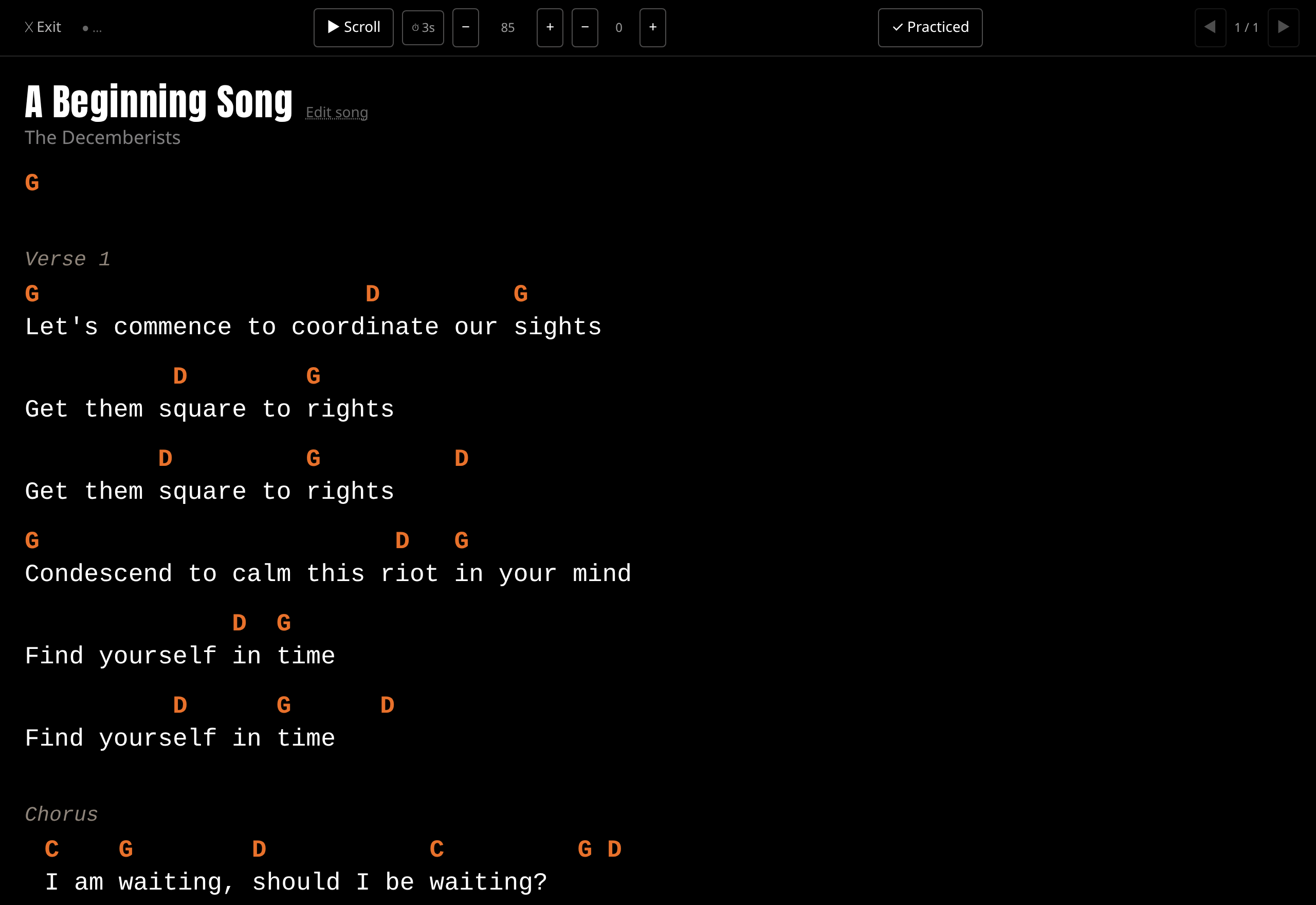
It holds a screen wake lock the whole time it's open, so the display won't sleep mid-song.
Auto-scroll has play/pause and speed +/− buttons. Speed is remembered per song — and separately per setlist entry when you opened it from inside a setlist — so a song can scroll at one speed on its own and another in a particular set.
Moving around: left/right arrows step between songs, space toggles scrolling. Because these are ordinary keypresses, Bluetooth page-turner pedals work automatically — AirTurn, iRig BlueTurn and similar. PageUp and PageDown work too.
The control bar shows the current key and lets you bump the capo up or down, transposing the chart live.
The ✓ Practiced button logs a practice for the song on screen and shows the running count beside it. It's deliberately one tap with no rating picker, because it gets used mid-set and mustn't interrupt you. The count moves immediately so the button never feels dead.
If that tap fails — usually because you're offline, which on stage is the common case — the count rolls back and the button turns red: "Couldn't log practice — check your connection." Nothing is queued. Re-tap it, or log it from the Rehearsal page afterwards.
Backing tracks
Premium. See Free and Premium in Getting started — on a free-tier account, the upload button opens an upgrade prompt instead.
On a song's page you can upload an audio file as a backing track, rename it, play it inline, and delete it.
Download for offline use. Each track has a download control that stores it on the device, so it plays with no signal. Downloaded tracks show their state, and you can remove the local copy without deleting the track itself.
Playback publishes to your device's media controls, so play/pause appears on the lock screen like any other audio app.
SetForge keeps your songbook on your own device. Chords, lyrics, setlists and practice tracking, working with or without a signal. Free for up to 200 songs — try it.