Rehearsal and practice tracking
Working out what to practise tonight: readiness, what match-fit means, and which songs are quietly going stale.
Premium. See Free and Premium in Getting started — a free-tier account sees an upgrade prompt here instead of the page below.
The Rehearsal tab practises one setlist at a time and answers a single question: what do I work on tonight?
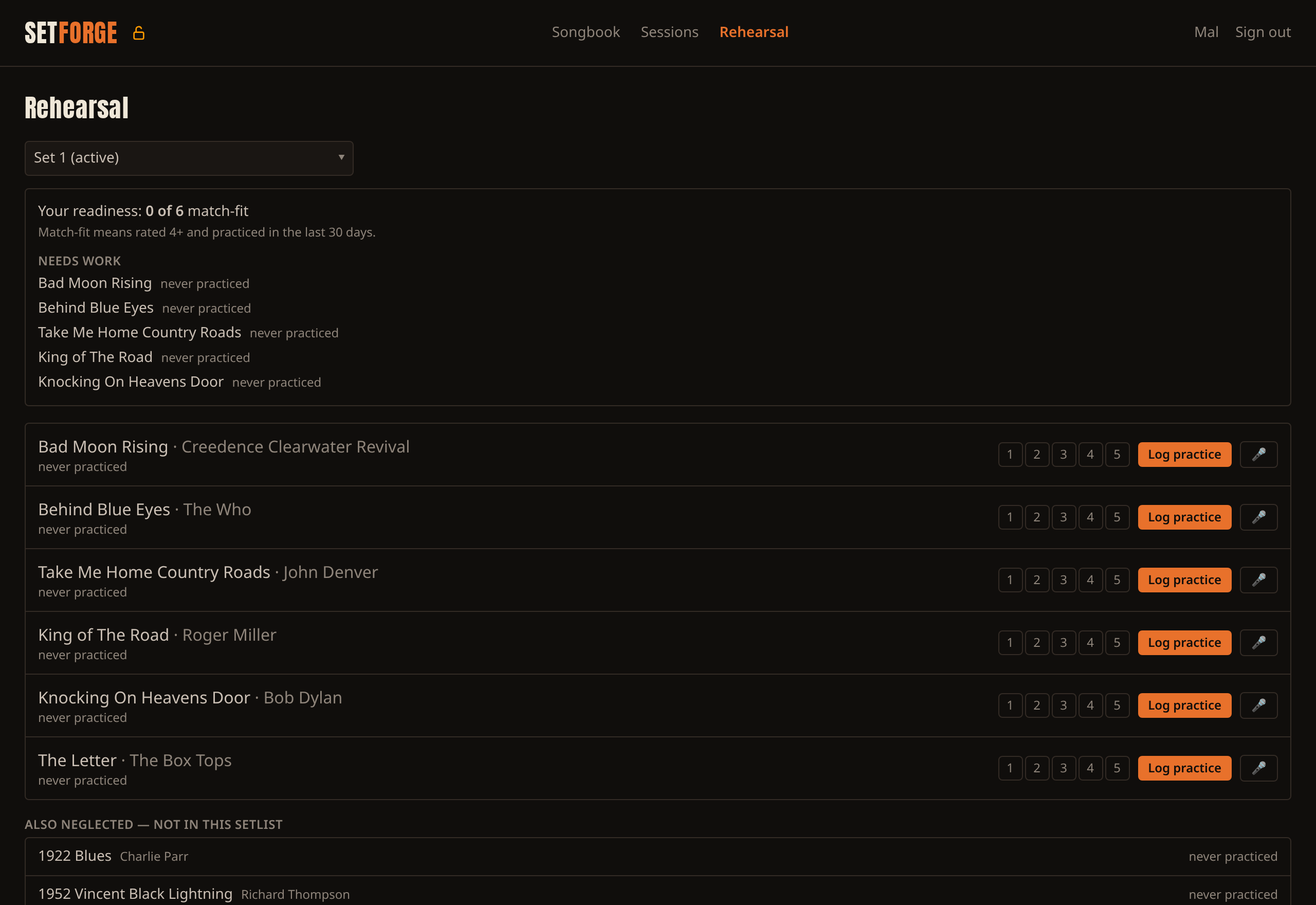
Choosing what to practise
A dropdown at the top lists every setlist. It opens on whichever setlist is marked "active", but you can pick any other one.
That choice is temporary. It doesn't change which setlist is active, and it reverts when you leave the page and come back — so practising a one-off set never quietly changes the default the rest of the app uses.
Readiness
Above the songs:
"Your readiness: 9 of 14 match-fit." Match-fit means rated 4 or 5 and practised in the last 30 days. Both halves are required — a song rated 5 eight months ago isn't gig-ready, and nor is one played yesterday but rated 2.
The word your is doing real work. Session setlists are shared with the whole group, but practice records are personal. Two members looking at the same shared setlist will see different numbers, and that's correct.
Needs work lists up to five songs that aren't match-fit, worst first, each with its reason — never practiced, practiced 9 days ago · rated 2/5. Songs you've never touched come top. If everything qualifies you'll see "Every song in this setlist is match-fit."
Also neglected
Below the practice list, up to ten songs from the rest of your songbook that have gone longest without attention — the ones quietly rusting because they aren't in the set you keep rehearsing. Anything already in the current setlist is excluded, so nothing appears twice.
This is on by default. Turn it off at Settings → Rehearsal → "Show neglected songs from the whole songbook" if you'd rather keep the page to the set in front of you.
Logging practice
Each song shows how long since you last practised it and a running count. Set a 1–5 confidence rating and tap Log practice.
Confidence can only be set here — Stage mode's ✓ Practiced button records the count and date only.
What gets stored: one row per song — the count, the date of the most recent practice, and your latest confidence rating. There is deliberately no practice history. You can see a song has been practised twelve times and when the last one was, but not when the other eleven happened. That's a design decision, not an omission, and it's why SetForge shows you a ranked list instead of progress charts.
Practice logging needs a connection. It's the one write in the app that doesn't work offline — everything else queues and syncs later. This is deliberate: the count is incremented on the server, so a queued retry risked counting twice. A failure is always shown rather than silently swallowed.
SetForge keeps your songbook on your own device. Chords, lyrics, setlists and practice tracking, working with or without a signal. Free for up to 200 songs — try it.